Phipps Electronics

Order within the next 

FREE SHIPPING OVER $199

50,000+ ORDERS

WORLDWIDE SHIPPING

SSL SECURED

CAN Bus Tutorial: An Introduction to CAN Bus

Contents

Have a primer on the popular automotive/EV communications protocol in this CAN bus tutorial.

Introduction

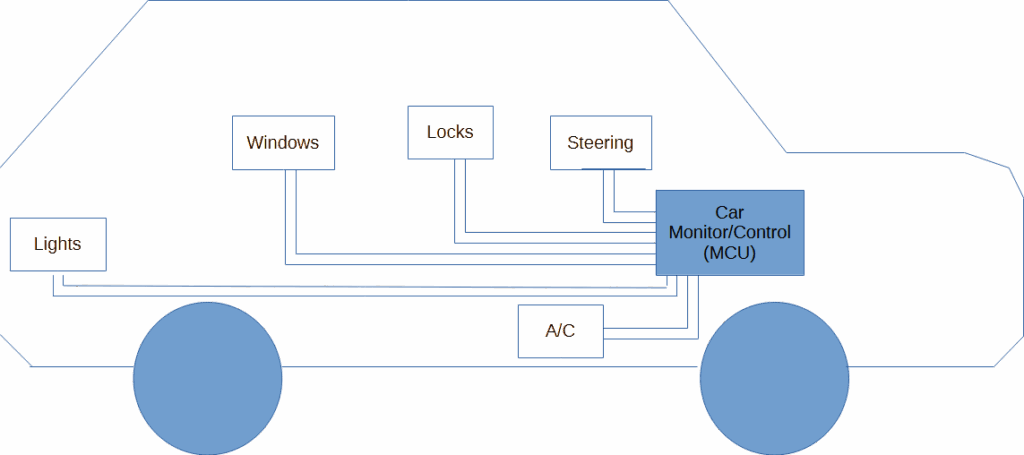
Before the mid-1990s, a lot of cars had a ton of electrical wiring inside them.  This added to the cost and complexity of their electrical layout. Not to mention, it was a headache to troubleshoot the car with this kind of wiring. Additionally, more wirings added to the weight of the car and can contribute to cause electrical fires. This was called point-to-point wiring.

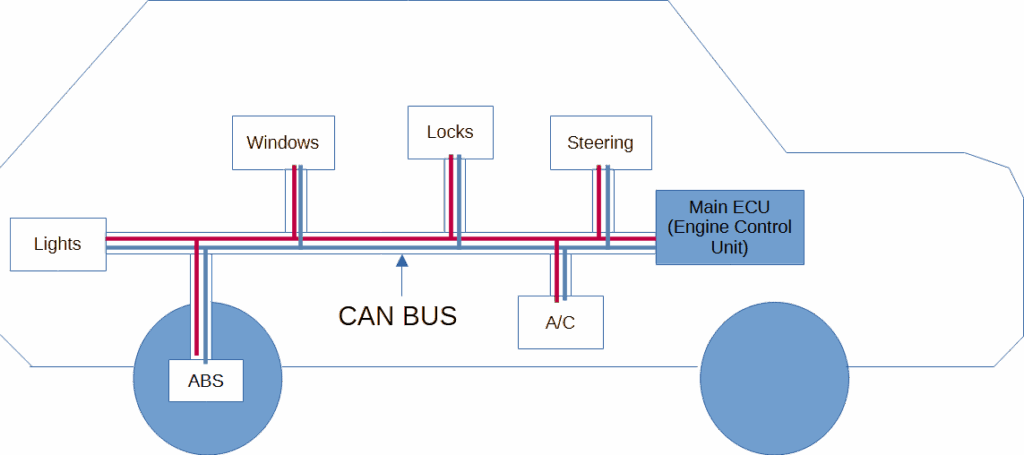
By 1986, Bosch developed a communications protocol designed to overcome the limitations of point-to-point wiring. The protocol was called the CAN bus (Controller Area Network). CAN bus allowed serial real-time communication between different kinds of components in a car (such as an ECU – Electronic Control Unit, or a CAN node. These components are basically composed of a CAN transceiver/controller and MCU). Since this bus only required 2 lines of wires (much like I2C), the wiring became much more simpler and cost-effective.

By the mid-1990s, several other automotive manufacturers adapted CAN for their automotive communication setup. From the year 2000s and up to today, CAN communication became the standard for automotive communication for nearly all modern vehicles including EVs (Electric Vehicles).

The CAN Bus Standard

CAN is a multi-master, message broadcast system type of bus. It does not require a master and a slave to communicate with each other (much like I2C). Instead, a message is broadcast to the bus, where nodes can receive it. This architecture preserves data consistency across all nodes.

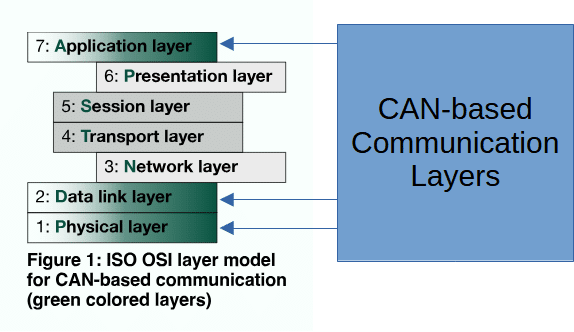
CAN is defined by ISO-11898: 2003 of the International Standardization Organization. Additionally, CAN follows a layered architecture as defined by the OSI model (Open Systems Interconnection).

Image courtesy of can-cia.org

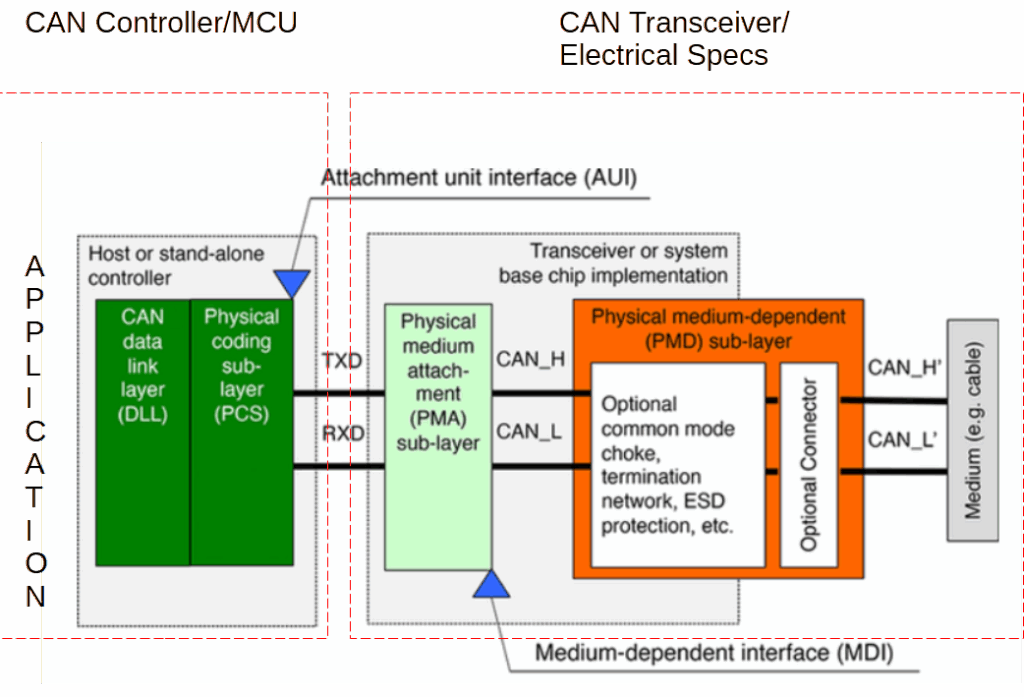
The lower link layers are composed of the Physical and Data Link layers. The Physical layer relates to the electrical and transceiver specifications of the system, while the Data Link layer relates to the protocol itself used by the CAN controller. The Application can be found in the application firmware of the MCU.

Image courtesy of can-cia.org

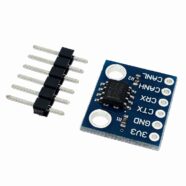
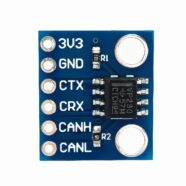
Referring to the diagram above, it is quite common to see a CAN transceiver chip such as the A1050. For the CAN controller,  the MCP2515. is quite popular.

Physical Layer / Electrical Specifications

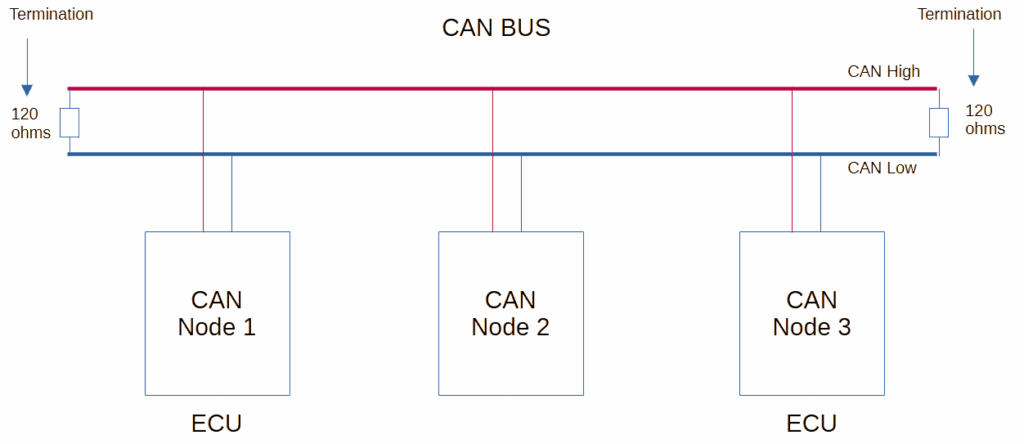
The CAN bus is composed of two wires – CAN -H (CAN High) and CAN-L (CAN Low). This is were CAN nodes can tap unto. A CAN node should have a CAN transceiver, controller and MCU built in. An ECU is an Electronic Control Unit (that is also a CAN node) that controls electrical subsytems in a car.

Below, you’ll see termination resistances on both ends of the CAN bus. Usually, in a transmission line, it’s not good to keep ends floating as this will produce unpleasant reflections. With this, both ends are terminated with a 120 ohm characteristic resistance.

A CAN bus wiring has high noise immunity due to its differential wire pairing, perfect for both automotive and industrial environments. It can work reliably over long distances (of up to 40 meters or more). It has automatic error-handling and may be able to support about 110 nodes on certain setups.

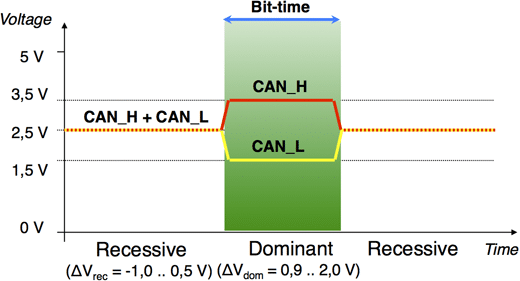
Below is the basic waveform characteristic of CAN. You’ll see the waveform idle line to be in the middle at about 2.5V. This is called a recessive state (which is basically a logic 1). The dominant state (logic 0) swings between 3.5V to 1.5V. These states are important for bus arbitration so that CAN nodes can communicate on a single bus line effectively. Basically, the recessive state is weakly biased, while the dominant state can override the recessive state. You’ll see later the importance of this feature when prioritizing from which node the CAN packet came from.

Image courtesy of can-cia.org

Data Link Layer / CAN Protocol

Below you can see the basic CAN data frame used in the CAN protocol. 

  •  
Basic CAN Data Frame

Below is the explanation of each field:

  • SOF – Dominant bit indicating the start of a frame. Synchronizes all nodes.
  • Identifier – Determines message priority of the frame. Lower IDs (more dominant states) have higher priority and win arbitration. The ID values can relate to the dominant and recessive states of the bus.
  • RTR – (Remote Transmission Request). RTR = 0 for data frame. RTR = 1 for remote frame (request data)
  • IDE – Indicates whether the frame uses a standard (11-bit) or extended (29-bit) identifier.
  • r0 – Reserved bit for future use.
  • DLC – Specifies how many bytes of data are in the Data Field (0 to 8).
  • Data – The actual payload being transmitted.
  • CRC – Ensures data integrity.
  • ACK – Any receiving node that successfully receives the frame sends a dominant bit in the ACK slot.
  • EOF – End-Of-Frame
  • IFS – Inter Frame Space. Time gap before the next frame can start.

An important area to consider is the priority of the frame that is indicated by the identifier. Lower value identifiers tend to be given higher priority. As an example, an Engine Control Unit, which gives real-time RPM data, is given an ID of 0x001 while an Infotainment System is given an ID of 0x300. Here, it’s clear that the Engine Control Unit is given priority due to its lower ID value, compared to the Infotainment System, for obvious reasons.

Below is an example table consisting of CAN bus identifiers in relation to their priorities, function and example node or ECU:

IdentifierPriorityExample ECURemarks
0x001HighestEngine Control Unit (ECU)Critical engine data (RPM, throttle)
0x050Very HighTransmission Control Unit (TCU)Gear Position, clutch status
0x100HighABS Control ModuleWheel speed, brake pressure
0x180Medium-HighElectronic Stability Control (ESC)Yaw rate, lateral acceleration
0x200MediumAirbag Control Module (ACM)Crash detection, deployment status
0x300Medium-LowBody Control Unit (BCU)Door, wipers, lighting
0x400LowHVAC Control ECUTemp settings, fan speed
0x500LowerInfotainment Control Unit (ICU)Audio, navigation, display
0x600Very LowTelematic Control Unit (TCU)GPS, remote diagnostics
0x7FFLowestDiagnotic Tool / TesterService

ApPlication Layer Protocols

The Application layer is where the real-world implementation of CAN is implemented. It is the firmware or program that defines the message content, manages device behavior and communication logic. This layer is also responsible for interoperability between different devices and manufacturers.

Here are some popular application layer protocols for CAN that you can check:

The next parts will guide you on several practical applications of using the CAN bus.

SHOP THIS PROJECT

SUBSCRIBE FOR NEW POST ALERTS

Subscribe to be the first to know when we publish a new article!
List Subscriptions(Required)

POPULAR POSTS

Scroll to Top