Phipps Electronics

Order within the next 

FREE SHIPPING OVER $199

50,000+ ORDERS

WORLDWIDE SHIPPING

SSL SECURED

How Do Hardware Voice Assistants Work?

Contents

How do voice assistants work?Interested in making your own? Know first the processes involved, here.

how do voice assistants work - sample circuit

Introduction

Hey Google! Alexa! Siri! What do these phrases have in common? They are wake words for a Voice Assistant (V.A.). You’ll need these wake words to enter voice recording mode, where your voice gets recorded and sent as a query to the V.A. After recording, you may find a bit of a lag, where several processes can happen (seems like the A.I. is thinking…). After which, you’ll be answered by the assistant with his or her own voice, together with the information you requested. However, one can wonder what really goes on with each process? Here, specifically, you’ll learn how simple hardware DIY voice assistants work.

The DIY HArdware Voice Assistant Flowchart

how do voice assistants work - flowchart

Above, you can see the processes involved in using a Voice Assistant. It comprises both hardware and cloud-based components that will be discussed. Note that this process is geared towards cloud-based voice assistants. Other voice assistants exists (such as offline, hybrid, smart-home integrated, etc.) 

Voice Recording

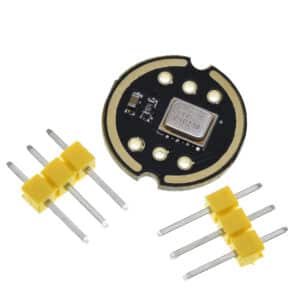
Digital voice recording is a common method for recording voice in a V.A., eliminating the complicated nature of analog audio circuits.  Nowadays, there are various types of digital microphones to choose from, one of which is the popular MEMS digital microphone. MEMS can output audio in different formats, such as PDM (Pulse Density Modulation) or I2S (Inter-IC Sound).

MEMS I2S Microphone Module – INMP441 PHI1003362 Phipps Electronics 2

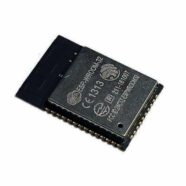
Additionally, digital audio can easily be stored in memory. Today, various microcontrollers can have access to RAM (such as ESP32, RP2040, STM32, etc.), wherein they can buffer audio data temporarily and work on it. They can filter and convert audio so that the next process (Speech-to-Text) can easily understand it.

Speech-To-Text (STT)

Gemini Text Generation Image

If you have limited hardware, Speech-to-text capability is best done in the cloud. You can take advantage of using IoT devices for this (Such as ESP32, RPI-PICO W, etc.). The IoT device becomes a frontend client for STT servers such as Google Gemini. Google’s Gemini API includes audio transcription capabilities that can perform STT.

Below is an example Python server code accessing the STT capability of Google Gemini.

				
					from google import genai

client = genai.Client()
response = client.models.generate_content(
    model="gemini-1.5-pro",
    contents=[{"audio": {"uri": "gs://your-bucket/audio.wav"}}]
)
print(response.text)


Implementing via hardware, you can use a proxy server for your client device. A proxy server, such as an RPI, cloud VM, or Flask server, will do. Below is an example code of a Python Flask Proxy Server

				
					from flask import Flask, request
import google.generativeai as genai

app = Flask(__name__)
genai.configure(api_key="YOUR_GEMINI_API_KEY")

@app.route('/upload', methods=['POST'])
def upload_audio():
    audio_data = request.data
    with open("temp.wav", "wb") as f:
        f.write(audio_data)

    model = genai.GenerativeModel("gemini-1.5-pro")
    response = model.generate_content([{"audio": {"file": "temp.wav"}}])
    return response.text

if __name__ == '__main__':
    app.run(host='0.0.0.0', port=5000)


Below is the firmware you can use to access the server using your hardware client (such as an ESP32)

				
					from flask import Flask, request
import google.generativeai as genai

app = Flask(__name__)
genai.configure(api_key="YOUR_GEMINI_API_KEY")

@app.route('/upload', methods=['POST'])
def upload_audio():
    audio_data = request.data
    with open("temp.wav", "wb") as f:
        f.write(audio_data)

    model = genai.GenerativeModel("gemini-1.5-pro")
    response = model.generate_content([{"audio": {"file": "temp.wav"}}])
    return response.text

if __name__ == '__main__':
    app.run(host='0.0.0.0', port=5000)


Large Language Models (LLM)

Gemini LLM used in hardware voice assistants

Again, utilizing the cloud, online LLMs are best used if you have limited hardware. Once you have generated text data, it’s easy to send it to an LLM. The LLMs are AI systems that can understand, generate, and interact with human text language. They are trained in massive amounts of data on the web. Most LLMs implement a neural network design called a transformer that specializes in handling sequences of text and capturing content. Some popular LLMs are OpenAI ChatGPT, Google Gemini, Anthropic Claude, Meta Llama, Mistral, and others. After the LLMs generate their response in text format, you’ll then need to proceed to the next step.

Below is sample code for an ESP32 (as a client) in interacting with a proxy server that handles HTTPS requests:

				
					#include <WiFi.h>
#include <HTTPClient.h>

const char* ssid = "YOUR_WIFI_SSID";
const char* password = "YOUR_WIFI_PASSWORD";
const char* serverUrl = "http://your-server-ip:5000/query"; // Flask endpoint

void setup() {
  Serial.begin(115200);
  WiFi.begin(ssid, password);
  while (WiFi.status() != WL_CONNECTED) delay(500);
  Serial.println("WiFi connected");
}

void loop() {
  if (WiFi.status() == WL_CONNECTED) {
    HTTPClient http;
    http.begin(serverUrl);
    http.addHeader("Content-Type", "application/json");

    String payload = "{\"text\": \"What is the capital of France?\"}";
    int httpResponseCode = http.POST(payload);

    if (httpResponseCode > 0) {
      String response = http.getString();
      Serial.println("LLM Response: " + response);
    } else {
      Serial.println("Error: " + String(httpResponseCode));
    }

    http.end();
  }

  delay(10000); // Wait before next query
}


Below is code on the server side using Python Flask using Gemini API.

				
					from flask import Flask, request, jsonify
import google.generativeai as genai

app = Flask(__name__)
genai.configure(api_key="YOUR_GEMINI_API_KEY")

@app.route('/query', methods=['POST'])
def query_llm():
    data = request.get_json()
    user_text = data.get("text", "")

    model = genai.GenerativeModel("gemini-1.5-pro")
    response = model.generate_content(user_text)

    return jsonify({"response": response.text})

if __name__ == '__main__':
    app.run(host='0.0.0.0', port=5000)


Text-To-Speech (TTS)

After the LLM generates textual data, the V.A. should now convert it into speech audio so that it can be sent to a loudspeaker amplifier. The most convenient way to do this is to use cloud services again, such as Google Gemini’s Text-to-Speech API.

Below is a pseudo-code utilizing text-to-speech on an ESP32 by interacting with a proxy server:

				
					from flask import Flask, request, send_file
import google.generativeai as genai
import pyttsx3

app = Flask(__name__)
genai.configure(api_key="YOUR_GEMINI_API_KEY")

@app.route('/speak', methods=['POST'])
def speak():
    data = request.get_json()
    text = data.get("text", "")

    # Use Gemini to refine or generate speech text (optional)
    model = genai.GenerativeModel("gemini-1.5-pro")
    response = model.generate_content(f"Convert this to speech: {text}")
    speech_text = response.text

    # Use pyttsx3 to generate speech locally
    engine = pyttsx3.init()
    engine.save_to_file(speech_text, "output.wav")
    engine.runAndWait()

    return send_file("output.wav", mimetype="audio/wav")

if __name__ == '__main__':
    app.run(host='0.0.0.0', port=5000)


Below is the code for the proxy server:

				
					from flask import Flask, request, send_file
import google.generativeai as genai
import pyttsx3

app = Flask(__name__)
genai.configure(api_key="YOUR_GEMINI_API_KEY")

@app.route('/speak', methods=['POST'])
def speak():
    data = request.get_json()
    text = data.get("text", "")

    # Use Gemini to refine or generate speech text (optional)
    model = genai.GenerativeModel("gemini-1.5-pro")
    response = model.generate_content(f"Convert this to speech: {text}")
    speech_text = response.text

    # Use pyttsx3 to generate speech locally
    engine = pyttsx3.init()
    engine.save_to_file(speech_text, "output.wav")
    engine.runAndWait()

    return send_file("output.wav", mimetype="audio/wav")

if __name__ == '__main__':
    app.run(host='0.0.0.0', port=5000)


Voice Output

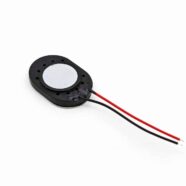
After downloading speech audio data from your TTS, you can send it to your amplifier for speaker output. The output of the TTS is usually in WAV format. To easily output digital audio, you can use a digital-to-analog converter, or a DAC chip, such as a MAX98357A. The MAX98357A has a digital I2S interface. An MCU that has an I2S interface (such as an ESP32 or STM32) can connect to this DAC chip through I2S.

Conclusion

You’ve just learned the processes in making your own DIY Hardware Voice Assistant. Are you ready to construct one in hardware? Let’s find out.

SUBSCRIBE FOR NEW POST ALERTS

Subscribe to be the first to know when we publish a new article!
List Subscriptions(Required)

POPULAR POSTS

Scroll to Top