Phipps Electronics

Order within the next 

FREE SHIPPING OVER $199

50,000+ ORDERS

WORLDWIDE SHIPPING

SSL SECURED

Working with the ESP32 Internal RTC

Contents

Learn about the ESP32’s internal RTC and how you can use it for time keeping functions.

Introduction

The ESP32 has an internal RTC (Real-Time Clock) that is dedicated for timer-related, time keeping, and low power functions. However, unlike popular RTC modules such as the DS1307 and DS1302, the ESP32’s RTC does not have backup battery capability. With this, the ESP32s cannot restore time after a power-on reset or power failure.

Basic Block Diagram

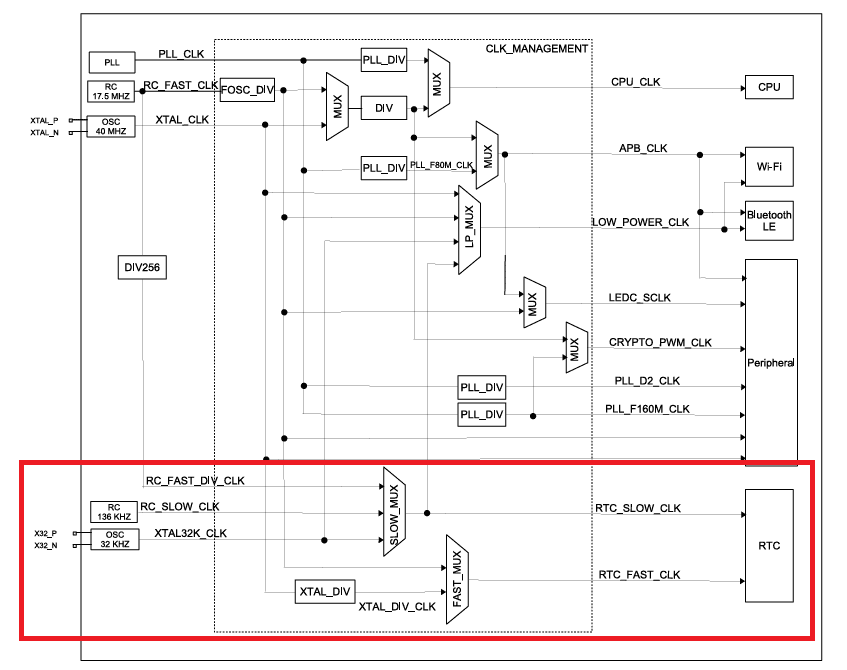
The basic block diagram of the ESP32 RTC can be seen below along with the ESP32 clock architecture:

ESP32 RTC Clock Architecture

Above, you’ll notice that the RTC clock can come from internal or external clock sources. Internal clock sources such as the system clock or internal RC oscillators and an external clock from an external 32 kHz oscillator.

Basic Functions

The basic functions of the ESP32 RTC includes:

  • Maintaining accurate time and date, particularly useful in schduling tasks and time-stamping functions.
  • Waking up the processor. The RTC module functions even in certain sleep modes, allowing it to wake up the processor based on timers or external events.
  • Operation even in deep sleep mode.
  • Managing peripherals while in sleep mode such as the ADC, touch sensors, and GPIOs.

How to Code for the RTC

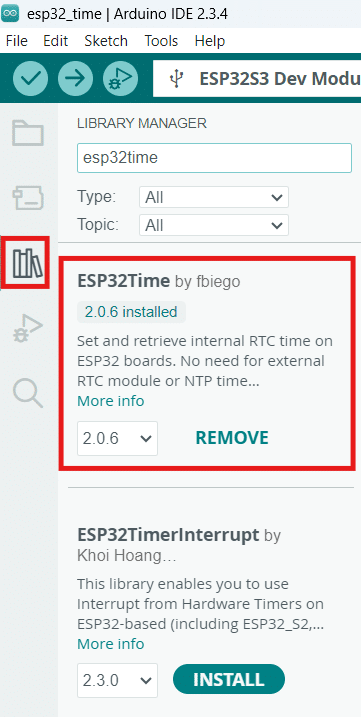
Fortunately, there is an easy-to-use library to code for the ESP32 RTC in Arduino. This library is called ESP32Time. After selecting your ESP32 board in Tools -> Board, go to the Library Manager and search for this library. Make sure to install it.

ESP32 RTC ESP32Time Library

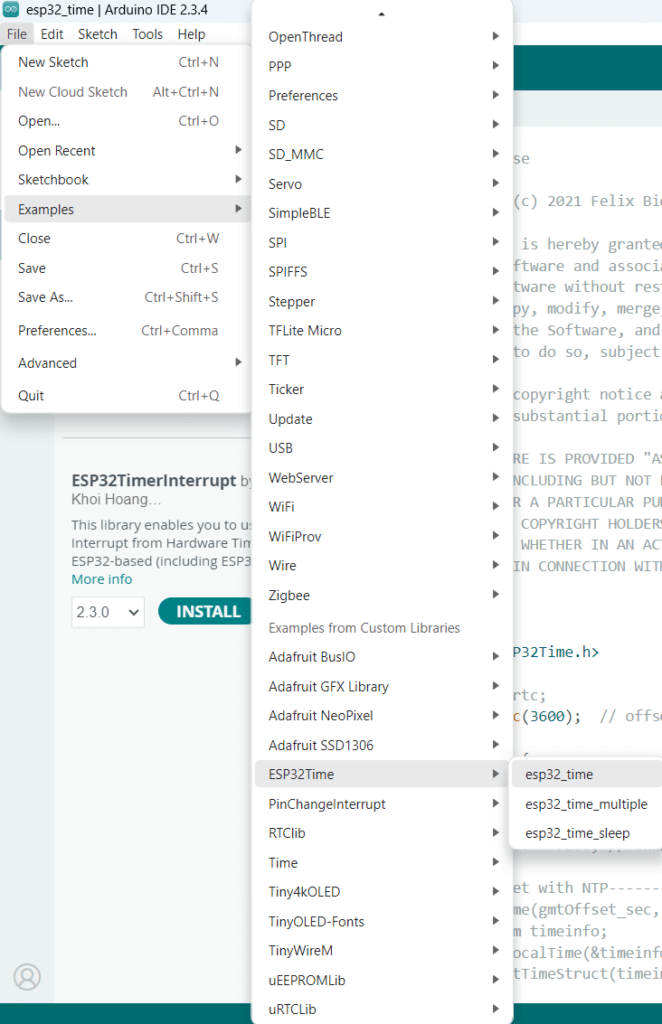
After this, you can open an example code. Go to File -> Examples -> ESP32Time -> esp32_time

You should be seeing code similar as below:

				
					/*
   MIT License

  Copyright (c) 2021 Felix Biego

  Permission is hereby granted, free of charge, to any person obtaining a copy
  of this software and associated documentation files (the "Software"), to deal
  in the Software without restriction, including without limitation the rights
  to use, copy, modify, merge, publish, distribute, sublicense, and/or sell
  copies of the Software, and to permit persons to whom the Software is
  furnished to do so, subject to the following conditions:

  The above copyright notice and this permission notice shall be included in all
  copies or substantial portions of the Software.

  THE SOFTWARE IS PROVIDED "AS IS", WITHOUT WARRANTY OF ANY KIND, EXPRESS OR
  IMPLIED, INCLUDING BUT NOT LIMITED TO THE WARRANTIES OF MERCHANTABILITY,
  FITNESS FOR A PARTICULAR PURPOSE AND NONINFRINGEMENT. IN NO EVENT SHALL THE
  AUTHORS OR COPYRIGHT HOLDERS BE LIABLE FOR ANY CLAIM, DAMAGES OR OTHER
  LIABILITY, WHETHER IN AN ACTION OF CONTRACT, TORT OR OTHERWISE, ARISING FROM,
  OUT OF OR IN CONNECTION WITH THE SOFTWARE OR THE USE OR OTHER DEALINGS IN THE
  SOFTWARE.
*/

#include <ESP32Time.h>

//ESP32Time rtc;
ESP32Time rtc(3600);  // offset in seconds GMT+1

void setup() {
  Serial.begin(115200);
  rtc.setTime(30, 24, 15, 17, 1, 2021);  // 17th Jan 2021 15:24:30
  //rtc.setTime(1609459200);  // 1st Jan 2021 00:00:00
  //rtc.offset = 7200; // change offset value

/*---------set with NTP---------------*/
//  configTime(gmtOffset_sec, daylightOffset_sec, ntpServer);
//  struct tm timeinfo;
//  if (getLocalTime(&timeinfo)){
//    rtc.setTimeStruct(timeinfo); 
//  }
}

void loop() {
//  Serial.println(rtc.getTime());          //  (String) 15:24:38
//  Serial.println(rtc.getDate());          //  (String) Sun, Jan 17 2021
//  Serial.println(rtc.getDate(true));      //  (String) Sunday, January 17 2021
//  Serial.println(rtc.getDateTime());      //  (String) Sun, Jan 17 2021 15:24:38
//  Serial.println(rtc.getDateTime(true));  //  (String) Sunday, January 17 2021 15:24:38
//  Serial.println(rtc.getTimeDate());      //  (String) 15:24:38 Sun, Jan 17 2021
//  Serial.println(rtc.getTimeDate(true));  //  (String) 15:24:38 Sunday, January 17 2021
//
//  Serial.println(rtc.getMicros());        //  (long)    723546
//  Serial.println(rtc.getMillis());        //  (long)    723
//  Serial.println(rtc.getEpoch());         //  (long)    1609459200
//  Serial.println(rtc.getSecond());        //  (int)     38    (0-59)
//  Serial.println(rtc.getMinute());        //  (int)     24    (0-59)
//  Serial.println(rtc.getHour());          //  (int)     3     (1-12)
//  Serial.println(rtc.getHour(true));      //  (int)     15    (0-23)
//  Serial.println(rtc.getAmPm());          //  (String)  pm
//  Serial.println(rtc.getAmPm(true));      //  (String)  PM
//  Serial.println(rtc.getDay());           //  (int)     17    (1-31)
//  Serial.println(rtc.getDayofWeek());     //  (int)     0     (0-6)
//  Serial.println(rtc.getDayofYear());     //  (int)     16    (0-365)
//  Serial.println(rtc.getMonth());         //  (int)     0     (0-11)
//  Serial.println(rtc.getYear());          //  (int)     2021

//  Serial.println(rtc.getLocalEpoch());         //  (long)    1609459200 epoch without offset
  Serial.println(rtc.getTime("%A, %B %d %Y %H:%M:%S"));   // (String) returns time with specified format 
  // formating options  http://www.cplusplus.com/reference/ctime/strftime/


  struct tm timeinfo = rtc.getTimeStruct();
  //Serial.println(&timeinfo, "%A, %B %d %Y %H:%M:%S");   //  (tm struct) Sunday, January 17 2021 07:24:38
  
  delay(1000);
}


Code Explanation

First, define an instance rtc() through the ESP32Time class. The parameter of this function is the offset time in seconds which relates to your timeszone. Note that this offset is set in seconds and 3600 seconds is equal to 1 hour. As an example, if you are in Sydney, the value of this variable should be 3600 * 10, which equals the GMT time + 10 hours for AEST (Australian Eastern Standard Time). If you are in daylight saving time, this should be 3600 * 11 or the GMT time + 11 hours.

				
					ESP32Time rtc(3600);  // offset in seconds GMT+1


Next, set the actual time through setTime(). There are different ways to set the time. It can be in integer type date and time or in epoch time form. Additionaly, you can change the offset through offset() so that the time relates to your actual timezone (note that the offset is in seconds).

				
					  rtc.setTime(30, 24, 15, 17, 1, 2021);  // 17th Jan 2021 15:24:30
  //rtc.setTime(1609459200);  // 1st Jan 2021 00:00:00
  //rtc.offset = 7200; // change offset value


There are several ways to acquire the actual time of the RTC and it depends on the format you want. There is the epoch, string type, and tm structure format as seen below. Choose one that suits your format.

				
					Serial.println(rtc.getLocalEpoch());         //  (long)    1609459200 epoch without offset


					Serial.println(rtc.getTime("%A, %B %d %Y %H:%M:%S"));   // (String) returns time with specified format


					struct tm timeinfo = rtc.getTimeStruct();
  //Serial.println(&timeinfo, "%A, %B %d %Y %H:%M:%S");   //  (tm struct) Sunday, January 17 2021 07:24:38


If you’re interested in the time tm structure form see below. This structure is used for combined time and date format mostly used for timekeeping/time-stmping functions.

				
					struct tm
{
  int	tm_sec;
  int	tm_min;
  int	tm_hour;
  int	tm_mday;
  int	tm_mon;
  int	tm_year;
  int	tm_wday;
  int	tm_yday;
  int	tm_isdst;
#ifdef __TM_GMTOFF
  long	__TM_GMTOFF;
#endif
#ifdef __TM_ZONE
  const char *__TM_ZONE;
#endif
};


Here are the Serial.println format parameter equivalents for date and time for the example timeinfo variable in tm structure form:

  • %A: Full weekday name (e.g., Monday)

  • %B: Full month name (e.g., January)

  • %d: Day of the month (01 to 31)

  • %Y: Year (e.g., 2025)

  • %H: Hour in 24-hour format (00 to 23)

  • %M: Minute (00 to 59)

  • %S: Second (00 to 59)

SAmple Code Run

SUBSCRIBE FOR NEW POST ALERTS

Subscribe to be the first to know when we publish a new article!
List Subscriptions(Required)

POPULAR POSTS

Scroll to Top